Automating Bookings, Manifests & Check-In for U.S. Tours
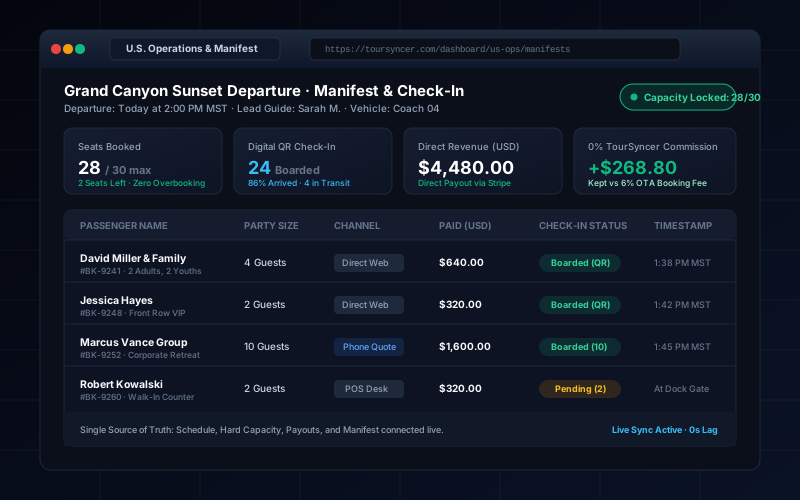
A practical guide for U.S. tour operators: how to connect direct bookings, schedules, real-time manifests, and guest check-in without overbooking or commission traps.
The Short Answer: How Operational Automation Works
A U.S. tour operator automates operations by establishing a single database record connecting products, departures, hard capacity, direct payments, live manifests, and digital check-in. When a customer books online or at a ticket desk, availability drops instantly across all channels, generating an updated manifest and QR check-in record without manual reconciliation.
The goal of automation is not to eliminate human decision-making. High-touch tour businesses succeed because of exceptional hospitality, safety protocols, and guide expertise. True automation handles deterministic data movement—making sure that when money changes hands, seats are deducted, names appear on the manifest, and tickets scan cleanly at the dock or trailhead.
The Hidden Cost of Disconnected Operations
Most American tour companies start with a patchwork of convenient tools:
- A website contact form or basic booking widget.
- A shared Google Sheet where dispatchers track departure dates and headcounts.
- A separate countertop card terminal (like Square or Clover) for phone orders and walk-ups.
- Clipboards with printed manifests handed to guides 15 minutes before departure.
This fragmented system works when you run two departures a day with 10 guests each. But the moment summer peak demand hits, friction multiplies:
- The Invisible Double-Booking: An online guest books the last 4 seats on a catamaran tour at 1:55 PM. At the same moment, a concierge calls your ticket desk and a desk agent books a party of 3. Because the card terminal does not talk to the website calendar, you now have 33 passengers for a 30-seat vessel.
- The Manual Manifest Scramble: A customer calls at 11:00 AM to switch from Thursday to Friday. Dispatch updates the calendar, but forgets to update the printed guide manifest. On Friday morning, the guide denies boarding because the guest is missing from the physical clipboard.
- The Commission Drain: To avoid handling tech infrastructure, operators surrender 6% to 8% per ticket to legacy booking platforms. On $500,000 in annual direct volume, that convenience fee costs your business $30,000 to $40,000 every single year.
The Operational Matrix: Manual vs. Single-Source-of-Truth
| Operational Layer | Disconnected Manual Approach | Automated Single-Source-of-Truth Model |
|---|---|---|
| Inventory Control | Spreadsheet counts; phone confirmations | Automated hard capacity locks with zero-lag seat decrements |
| Guest Manifest | Printed sheets printed the night before | Real-time digital manifest syncing walk-ins and direct web bookings |
| Check-in Workflow | Paper sign-offs and clipboard clipboards | Mobile camera QR scan with instant arrival timestamp logging |
| Payment Collection | Separate card swiper disconnected from manifest | Integrated merchant payments mapped directly to booking & passenger IDs |
| Tax / Compliance | Assumed software automates state nexus | Software captures configured state tax rates; operator files local nexus |
What Should Be the Single Source of Truth for a Tour Booking?
To automate tour operations safely, you must declare what constitutes the authoritative master record. In TourSyncer, that master record is the Departure Instance.
Every departure instance binds seven records into an unbroken chain:
[Product & Pricing Rules] ──> [Departure Schedule & Hard Capacity]
                                        │
                                        ▼
                                 [Booking Record]
                                        │
             ┌──────────────────────────┴──────────────────────────┐
             ▼                                                     ▼
     [Payment & Invoice]                                    [Guest Manifest]
             │                                                     │
             ▼                                                     ▼
    [Stripe USD Payout]                                  [Digital QR Check-In]
- The Product: The defined tour experience (e.g., "Grand Canyon Sunset Excursion").
- The Schedule & Capacity: The specific date, start time, lead-time cutoff, and maximum passenger cap (e.g., 28 maximum seats).
- The Pricing Rule: Active seasonal rates, weekday discounts, and guest tier pricing (Adult $85, Youth $55).
- The Booking: The reservation record linking buyer contact details, party size, notes, and waiver flags.
- The Payment: Direct Stripe transaction ID, net fare, and separated sales tax line item.
- The Passenger Manifest: Individual traveler names, headcounts, dietary/mobility notes, and ticket status.
- The Check-In State: Real-time arrival flags updated via guide smartphone scan.
When every customer touchpoint reads and writes to this same departure instance, manual sync errors disappear entirely.
Hard Capacity Locks vs. Soft Holds
Overbooking prevention requires understanding the difference between a soft hold and a hard capacity lock.
A soft hold reserves seats temporarily while a shopper enters credit card details. If poorly configured, abandoned checkout carts can artificially lock out legitimate paying customers during busy hours.
In contrast, TourSyncer's capacity engine uses deterministic decrementing:
- Seats are held with tight, operator-defined expiry windows during active web checkout.
- The moment Stripe confirms authorization, the seats convert into a permanent decrement against remaining capacity.
- If a phone dispatcher books a walk-in at the counter, capacity decrements instantly across both online checkout engines and internal desk portals.
- Once the cap is hit (e.g., 30/30), the checkout widget turns off booking availability automatically, displaying a "Sold Out" badge.
Payment, Currency, and Legal Boundaries in the United States
Operating a tour business in the United States requires navigating clear legal, banking, and tax boundaries.
1. Payment Gateway Autonomy (Direct Merchant Payouts)
Many legacy platforms force operators into an aggregator payout model, holding your funds in escrow and disbursing payouts on their own schedule. TourSyncer integrates directly with your own Stripe account.
- Customer funds land directly in your domestic U.S. bank account via daily rolling payouts.
- TourSyncer charges 0% booking commission on direct website bookings. You pay only standard credit card interchange fees (typically 2.9% + 30¢ for online card processing).
2. The Tax Separation Boundary
Critical Disclaimer: No booking software makes an American business tax-compliant on its own. U.S. sales tax nexus rules vary dramatically across state, county, and municipal jurisdictions (e.g., Alaska bed taxes vs. Florida tourist development taxes vs. California amusement exemptions).
TourSyncer provides the tools to configure transparent, itemized percentage sales tax line items at checkout and on invoices. However, operators must consult a certified public accountant (CPA) to establish their specific local tax collection and remittance requirements.
Day-of-Tour Operations: Digital Manifests & Mobile QR Check-In
The final breakdown in manual operations usually happens at the departure gate. Printed manifests cannot reflect bookings made 45 minutes prior, and paper clipboards offer zero operational analytics.
With digital guest check-in:
- Automated Ticket Delivery: Upon payment, the guest receives an instant confirmation email with an embedded QR pass compatible with Apple Wallet and mobile browsers.
- Field-Ready Guide Access: Guides access their daily roster via any smartphone or tablet browser—no forced app store download required.
- Instant Barcode / QR Scanning: The guide points their phone camera at the guest's ticket. The screen flashes green, logs the exact check-in timestamp, and updates dispatch.
- Emergency Visibility: If a departure is scheduled for 2:00 PM and 24 of 28 guests are boarded at 1:55 PM, dispatch sees the 4 missing names and contact numbers instantly, enabling quick outreach before wheels up.
A 4-Week Rollout: The One-Departure Pilot Protocol
Never cut over your entire tour business overnight. Follow this disciplined 4-week validation protocol to migrate safely:
Week 1: Foundation & Rate Setup
- Define your core tour products in TourSyncer.
- Configure base rates, passenger tiers (Adult/Child), and departure time slots.
- Connect your direct Stripe merchant account and verify test card transactions.
Week 2: Staff Training & Manual Desk Bookings
- Train ticket desk agents to enter counter walk-ins and phone orders into TourSyncer.
- Verify that manual bookings decrement capacity immediately and emit PDF confirmation receipts.
Week 3: The Single-Departure Live Pilot
- Pick one low-risk, recurring weekday departure (e.g., Tuesday 10:00 AM).
- Route all direct web sales for that specific departure through TourSyncer.
- Equip the lead guide with a smartphone to execute mobile QR check-in at boarding.
- Verify payment settlement, manifest completeness, and passenger boarding speed.
Week 4: Full Cutover & Channel Expansion
- Embed the TourSyncer booking widget across all remaining tour pages on your website.
- Retire manual spreadsheets and enjoy unified, commission-free operational control.
Conclusion & Next Steps
Automating bookings, manifests, and check-in is not about complex algorithms—it is about operational sanity. By connecting schedules, capacity locks, Stripe merchant payouts, and live digital manifests into one system, U.S. tour operators eliminate overbookings, reclaim tens of thousands in lost commission fees, and deliver a seamless guest arrival experience.
To explore how TourSyncer powers modern American tour businesses, review our U.S. market guide or evaluate our transparent 0% commission pricing.
Frequently asked questions
Which operational tasks can TourSyncer automate for U.S. operators?
TourSyncer automates inventory decrements, schedule capacity, pricing tier rules, manifest generation, and digital QR check-in status updates. Staff hiring, guide assignments, customer exceptions, and refund decisions remain under manager discretion.
Does TourSyncer hold customer funds or take a percentage cut of ticket sales?
No. TourSyncer charges 0% booking commission on direct website sales. Payments flow directly into your own merchant account (such as Stripe) with standard interchange processing rates.
Can TourSyncer handle walk-up ticket sales at a physical booth or dock?
Yes. Staff can enter manual counter bookings through any tablet or desktop browser. The system immediately decrements departure capacity and updates the live guide manifest in real time.
Does TourSyncer calculate U.S. state and local sales taxes automatically?
TourSyncer allows operators to configure explicit percentage tax rates on products. However, operators remain responsible for determining state sales tax nexus obligations with their CPA.
How does digital check-in work for guides in the field?
Guides access a responsive web or mobile manifest view, allowing them to scan guest QR codes using their device camera or manually toggle attendance with instant timestamps.
Can we test one departure before migrating all our tours?
Yes. TourSyncer supports running single pilot departures alongside your existing tools, allowing you to verify payment receipts, manifest accuracy, and check-in speeds with zero operational risk.