
Tour Operator Software From booking to guest check-in.

Take bookings on your website or at the desk. Send private groups an invoice, assign guides, and give your team the itinerary and guest list for each departure.

Start free

As Seen On

KWWLKTTCInternational Business TimesAssociated PressStreetInsiderBarchartNewsBreakStar TribuneWBNG

How to set up, sell and run a tour

The reservation gives your desk, invoice owner and guide the details they need for that departure. Start with the steps you use today.
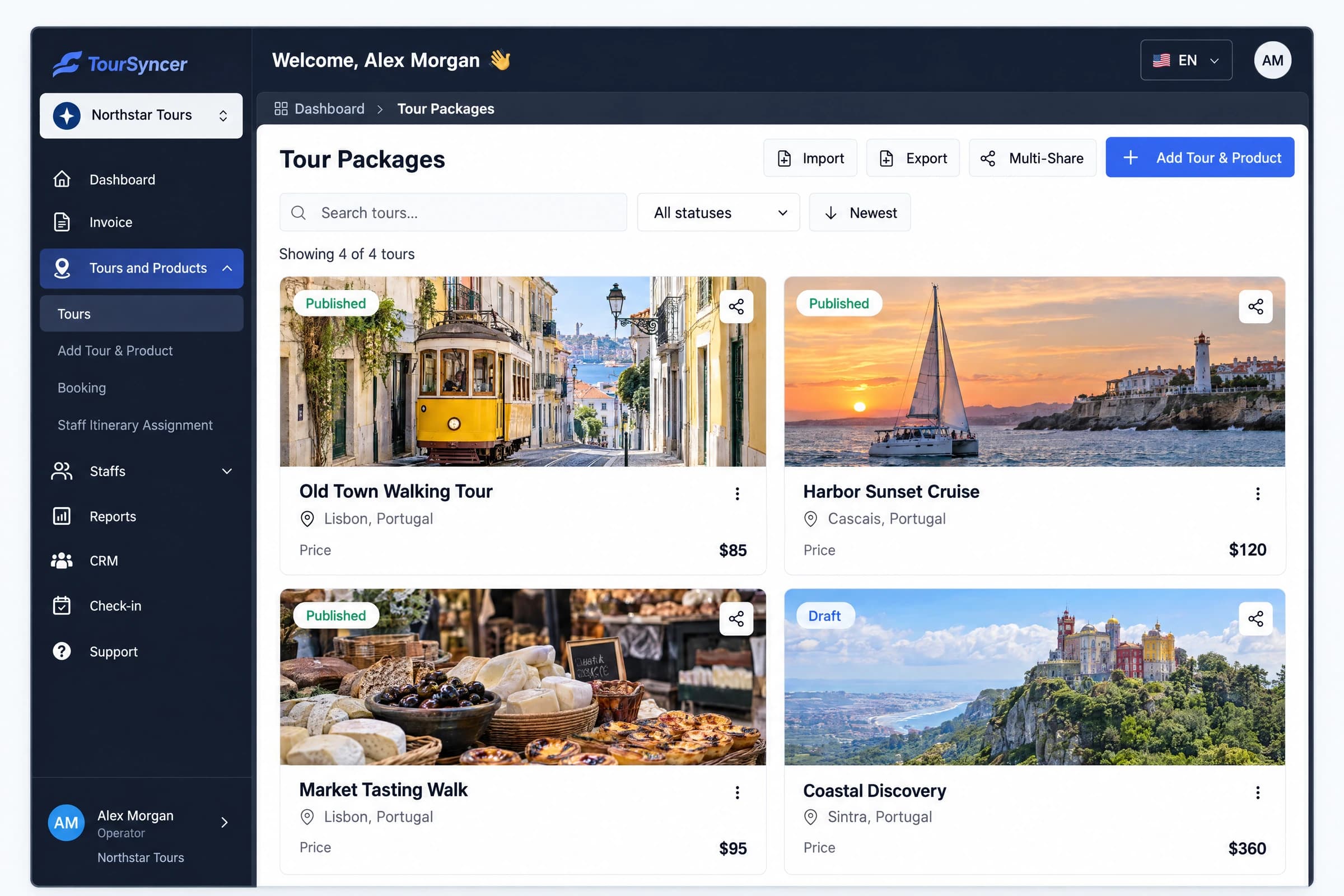
TourSyncer tour catalog with published and draft products, destinations and prices
Your tours, in one place.
1

Build the itinerary and set prices

Lay out a day trip or multi-day itinerary. Set guest, group, weekday and seasonal rates on the tour you plan to sell.

  • Day-by-day activities and stops
  • Guest-type and seasonal rates
  • Itinerary PDF and customer-facing policies
View this workflowTourSyncer tour catalog with published and draft products, destinations and prices
2

Schedule departures and assign staff

Publish the dates and seats you can sell. A manager assigns the guide, driver or agent to each departure or itinerary activity.
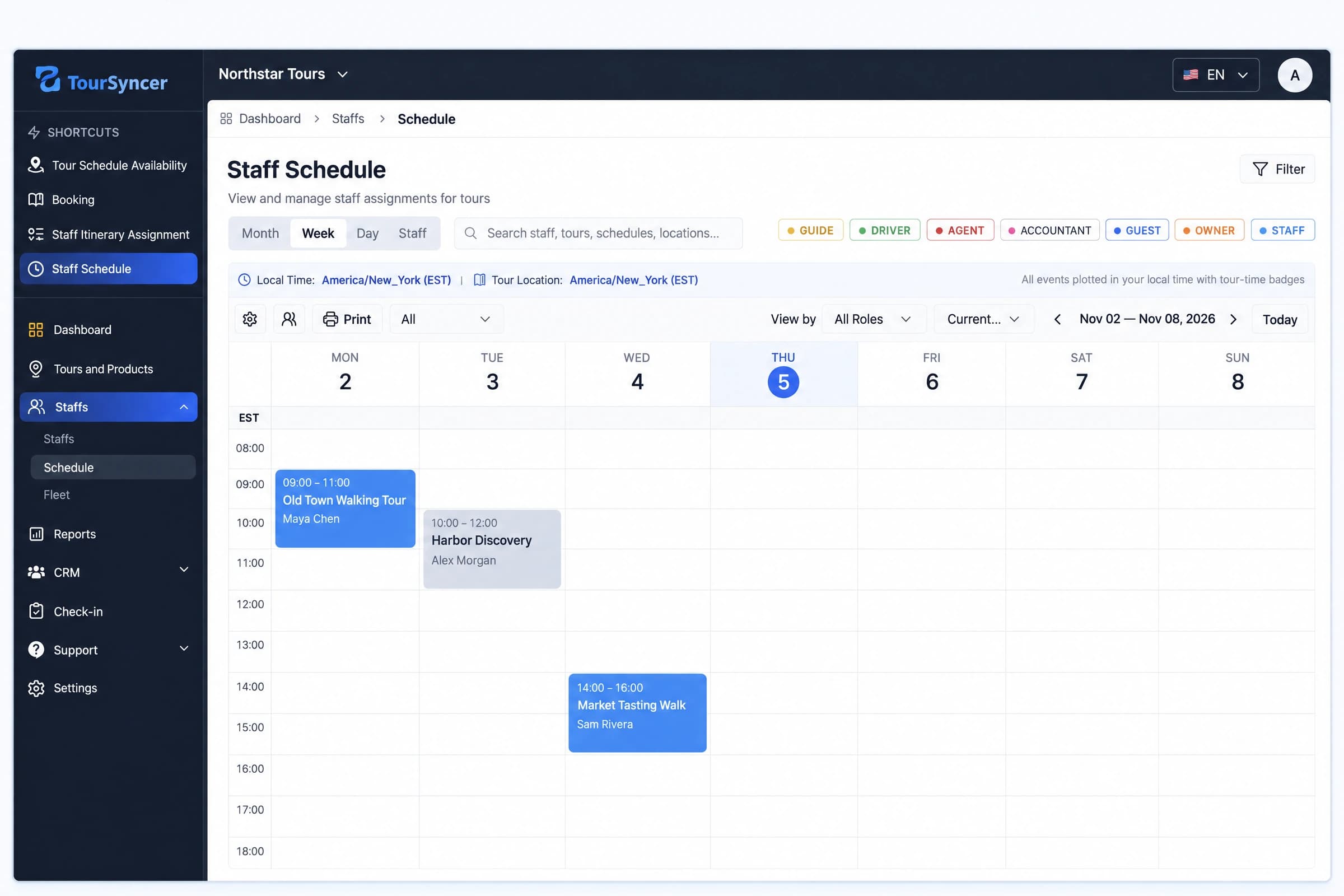
  • Recurring and one-off departure times
  • Capacity and blackout dates
  • Departure and activity assignments
View this workflowTourSyncer staff schedule showing guide assignments for upcoming departures
3

Take bookings and invoice private groups

Share a booking link or add a widget to your website. For a booking taken at the desk, enter the reservation and create an invoice when the group needs one.
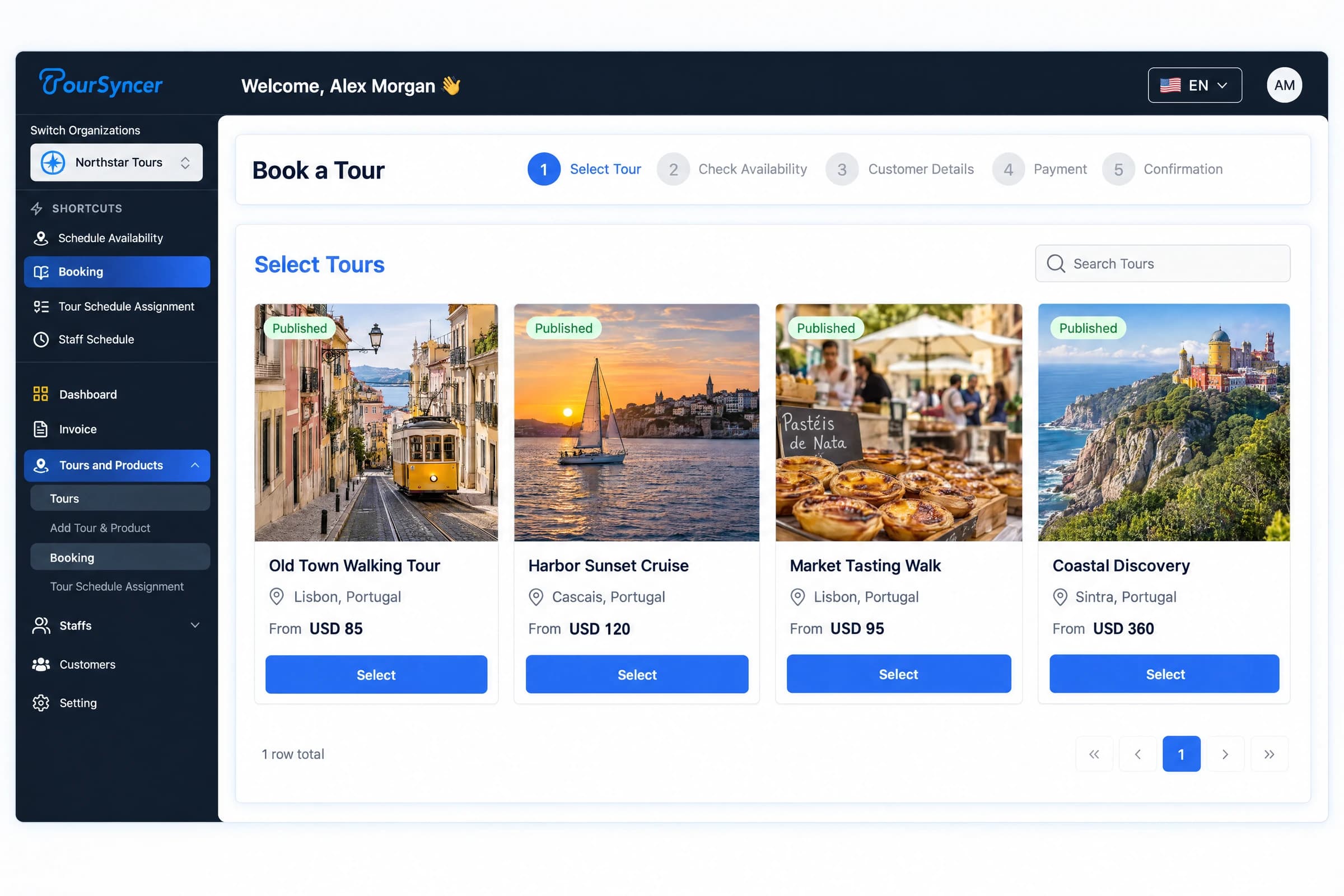
  • Shareable links and website embeds
  • Staff-entered reservations
  • Invoices, deposits and payment links
View this workflowTourSyncer online booking workflow with four tour products and traveler prices
4

Prepare the group and check in guests

Keep guest names and payment status with the booking. The assigned guide can open the departure manifest on a phone and record individual arrivals.
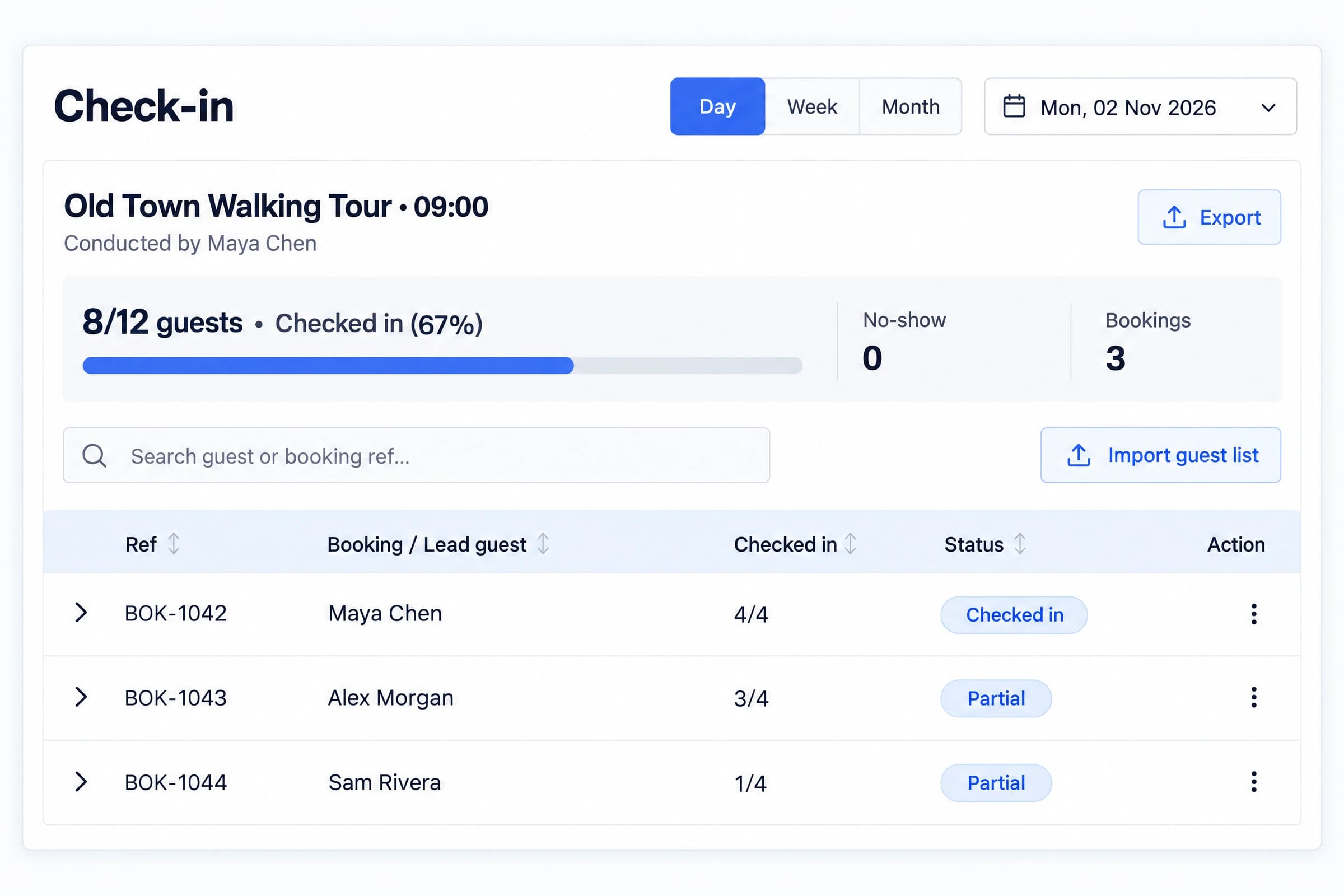
  • Guest details and group records
  • Mobile manifests and individual check-in
  • Print and export for field handoffs
View this workflowTourSyncer guest check-in manifest with eight of twelve guests checked in

Find the workflow that fits your business

Start with the step that slows your team down. Use direct booking, private group billing or a guide roster first, then connect the rest as you need it.

Tour operations coordinator and guide reviewing departure plans at the office

Day & Multi-Day Tours

Tour Operators

Set dates, capacity and prices for day tours or multi-day trips. Give reservations, finance and guides the booking, invoice and roster for each departure.

Independent city tour guide welcoming guests at the meeting point

Solo Guides & Small Teams

Independent Tour Guides

Share a booking link while you are out guiding. Set your group limit and pull up the next departure’s guest list on your phone.

Tour operations coordinator and guide reviewing departure plans at the office

Front Desk & Guest Services

Resort and Hotel Concierge Teams

Book resort-run experiences at the desk. Invoice the organizer for a private party and give the assigned host a current guest list.
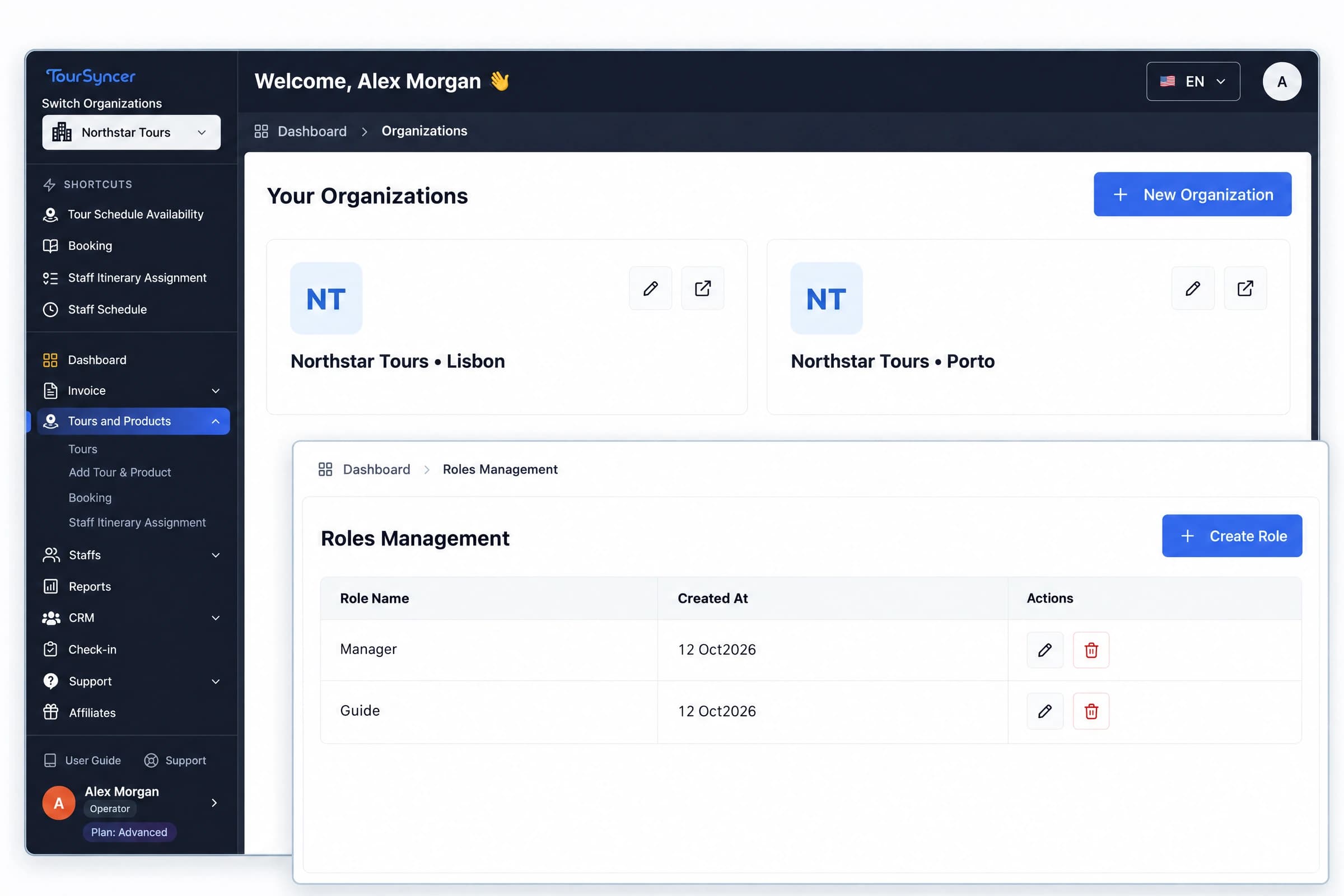
TourSyncer organization workspaces and manager and guide roles

Locations, Brands & Roles

Multi-Location Tour Teams

Set up workspaces for locations or brands and give owners, managers and guides access for their roles. Compare workspace and team limits by plan.

Visitor attraction host checking arrivals before a guided visit

Museums & Guided Venues

Visitor Attractions

Schedule guided visits, manage timed capacity, assign staff, accept group bookings, and run mobile guest check-in.

Retreat organizer welcoming arriving guests and reviewing participant details

Wellness & Group Travel

Retreat Organizers

Package dates, tiered guest pricing, itineraries, participant details, invoices, and payment links in one workflow.

Travel agency team planning a multi-day itinerary together

Travel Planning Teams

Agencies & DMCs

Separate teams with workspaces and roles while managing customers, custom itineraries, groups, and invoices.

Customer Love

Trusted by tour operators worldwide

Feedback shared directly by the operators and agencies who use TourSyncer. Each review below names the business that shared it.

Rated 5.0/5 by TourSyncer agency customers (first-party reviews)

★★★★★
Guide Assignments in One Place

Managing our entire fleet of drivers and guides used to be chaos. Now, the staff management features allow us to assign and track everyone effortlessly.

NT
Nextdoor Travels
Explore this workflow →
★★★★★
Schedules and Bookings in One View

The schedule management tool is a lifesaver! We no longer have booking conflicts, and our itinerary planning has become incredibly smooth.

HB
Himalayan Bliss
Explore this workflow →
★★★★★
Faster Custom Itinerary Workflow

Creating diverse tour packages has never been easier. We can customize itineraries and pricing in minutes, giving our clients exactly what they want.

HL
Harmonic Liberation
Explore this workflow →
Pricing

Pricing plans for every travel business

Choose the plan that fits your operation. TourSyncer adds 0% booking commission; standard Stripe processing fees still apply.

Save up to 17%
$0 Basic

Basic (Free)

For solo guides & independent operators.

$0/mo
What's Included
1 Team Members
25 Customers
1 Organizations
5 Tours/Product
1 GB Storage
Private Booking system
Advanced itinerary builder
Guest check-in
Your own payment gateway
Send emails through your own email provider.
Standard support
Starter
For freelancers
$49/mo
Billed monthly
What's included
1 Team Members
1000 Customers
1 Organizations
25 Tours/Product
5 GB Storage
Private Booking system
Advanced itinerary builder
Staff scheduling
Guest check-in
Analytics report dashboard
Customer groups management
Role management
Your own payment gateway
Send emails through your own email provider.
Custom branding
Standard support

Create a free account first. Choose Starter and monthly billing in your account when you are ready to upgrade.

Create free account →
Advanced
For multi-location agencies & DMCs (10+ staff)
$499/moEarly Bird
$249/mo
Billed monthly
What's included
100 Team Members
Unlimited Customers
2 Organizations
Unlimited Tours/Product
100 GB Storage
Private Booking system
Advanced itinerary builder
Staff scheduling
Guest check-in
Analytics report dashboard
Customer groups management
Role management
Custom invoice
Your own payment gateway
Send emails through your own email provider.
Custom branding
Priority support & video onboarding

Create a free account first. Choose Advanced and monthly billing in your account when you are ready to upgrade.

Create free account →
Compare all plan limits and choose your fit
Current limits from the same plan data as the pricing cards. Unlimited means no numeric cap for that resource.
LimitBasic (Free)StarterProAdvanced
Team members1110100
Stored customers251,000UnlimitedUnlimited
Workspaces1112
Tours52550Unlimited
Bookings per month10UnlimitedUnlimitedUnlimited
Manual invoices per month10100UnlimitedUnlimited
Live schedules per tour250100Unlimited
Itinerary items per tour102550Unlimited
Custom roles5525Unlimited
Customer groups5525Unlimited
Storage (GB)1520100

Bookings and manual invoices use monthly usage windows anchored to your account, including on yearly subscriptions. The allowance resets each month; deleting a record does not restore a used allowance. Team, customer, workspace, tour, group, role, and storage limits are capacity limits. The schedule allowance counts today’s and future departures per tour; past departures do not consume it. Itinerary items are capped per tour. Your account shows the applicable reset date and usage.

When a limit is reached, the affected creation action is blocked. Review usage and the available upgrade before adding more records. Unlimited does not remove other plan limits or feature requirements.

Starting solo? Basic (Free) includes 5 tours, 2 live schedules per tour, and 10 bookings per month. Check these allowances against your next departures.

Assigning guides or drivers? Staff scheduling starts with Starter. It includes 1 team member; compare the team allowance before inviting staff.

Email setup requirements

Plans that include this feature let you connect your email provider. You will need the provider's SMTP connection details and an account allowed to send mail. Your email provider's sending limits and charges still apply.

Enterprise

Custom solutions for large-scale operations. Tailored features, dedicated support, and SLAs built for your business.

Custom Pricing
Contact us for a custom quote.

Problem ↔ Solution

Stop juggling apps. Start running your tour business.

Running a tour business shouldn't mean spending late nights copy-pasting spreadsheets or forfeiting 20%+ of your profits to booking marketplaces. TourSyncer provides an automated backend that handles the chaos so you can focus on leading memorable excursions.

Without TourSyncer

  • Spreadsheets for bookings, emails for confirmations
  • Double-bookings and missed reservations
  • Manual invoicing and chasing payments
  • Separate tools for staff, CRM, and itineraries
  • Per-booking commissions eating your margins

With TourSyncer

  • One dashboard for every booking, walk-in, and embed
  • Capacity-aware schedules that reduce booking conflicts
  • Booking-linked invoices, payment links, and refunds
  • Bookings, staff, CRM, itineraries — all unified
  • 0% TourSyncer booking commission; Stripe fees still apply

Everything in one platform

Booking Management

Take live bookings 24/7, capture walk-ins, or embed on your existing website.

Bring Your Own Gateway

TourSyncer adds no per-booking commission. Connect your own Stripe account. Standard Stripe processing fees still apply.

Smart Invoicing

Create booking-linked or custom invoices, collect partial payments, issue receipts, and manage refunds.

Travel CRM

Centralize customer profiles, preferences, and history to drive repeat bookings.

Group Tour Management

Organize travelers into manual or automatic groups and keep manifests and group email history together.

Analytics & Reports

Review operational, financial, booking, and audit reports from the same workspace.

Communication Management

Use your SMTP settings for customer communication and keep group email history with customer records.

Configurable Booking Setup

Configure hosted pages, embeds, custom booking forms, subdomains, policies, and business contact details.

Embed Anywhere

Drop into WordPress, Wix, Squarespace, or any custom site with one line of code.

Start with online bookings.

?

Frequently asked questions

Find answers to common questions about our pricing and plans.

Is there a free trial?
TourSyncer currently shows a $0 Basic plan rather than a time-limited trial. Check the pricing page for current limits and availability before choosing a plan.
What does tour operator software do?
It connects a guest’s booking to the departure’s availability, prices, payment, itinerary and roster. In TourSyncer, the reservations desk, invoice owner and guide can work from the details they need for the same departure.
Are there any hidden fees or per-booking commissions?
TourSyncer charges 0% booking commission and adds no per-booking platform fee. Subscription charges depend on your plan, and standard Stripe payment-processing fees still apply when you accept card payments through your own Stripe account. See the pricing page for current plan details.
Can I integrate TourSyncer with my existing website?
Yes. You can add the TourSyncer booking widget to an existing website or share a hosted booking page directly. TourSyncer also supports configurable booking forms, business details, policies, and subdomain settings.
Can I build and price a multi-day itinerary?
TourSyncer lets you build hourly, one-day, and multi-day products with day-by-day activities and stops. You can configure age, group, weekday, date, and seasonal pricing, then export a customer-ready itinerary PDF.
How do I assign staff and organize groups?
A manager can assign a guide, driver or agent to a departure or an itinerary activity. Keep parties together in customer groups and give authorized staff the current manifest with individual guest names.
Can a resort concierge book a tour or invoice a private group?
For experiences the property sells directly, staff can share a booking link or enter the reservation at the desk. Create an invoice for the organizer, record a deposit, and give the host the current guest list.
Can I manage tours across more than one location?
Use separate workspaces for locations or brands and give staff roles for the work they do. Review the workspace and team limits on the plan you need.
What types of tours, activities, or sessions can I sell?
You can configure hourly, one-day, and multi-day products with recurring or date-specific schedules, capacity limits, blackout dates, and multiple pricing rules. That makes the same platform useful for tours, tastings, cooking classes, guided attractions, retreats, and other scheduled experiences.
What payment methods can I accept?
TourSyncer connects to your own Stripe account for card payments, Apple Pay, Google Pay, and eligible local payment methods. Availability depends on your Stripe account, country, currency, device, and configuration. Standard Stripe processing fees apply.
Can guests pay with Apple Pay and Google Pay?
Yes. Guests can use Apple Pay and Google Pay through your connected Stripe checkout where eligible. Availability depends on your Stripe account, country, enabled payment methods, and the guest's device and browser. Standard Stripe processing fees still apply.
How do I cancel a subscription?
You can cancel from your account at any time before renewal. Cancellation takes effect at the end of the current billing cycle, and access continues until then. Paid fees are not refunded or prorated except where the terms or applicable law require it. Review the billing terms before purchasing; contact us about a specific upgrade or downgrade.
Is my business data and customer information secure?
TourSyncer uses authenticated workspaces and role-based permissions, while Stripe handles card-payment data. Review the privacy policy and terms of service for the current contractual details that apply to your account.
Can I customize the system to match my brand?
TourSyncer supports business details, booking-form configuration, subdomain settings, legal information, and custom SMTP configuration. The current iOS and Android companion apps are TourSyncer-branded; do not assume a separate app-store app under your business name.
What kind of support is available?
Support options can vary by plan. Check the current pricing page for plan entitlements or contact [email protected] before purchasing if a specific support level is required.
TourSyncer explainer

See TourSyncer in action

In under two minutes, see how bookings, itineraries, schedules, staff, invoicing, and customer management come together in one tour operations platform.

Read the timed captions
Read the product walkthrough

Use this text overview to explore the same booking-to-departure workflow at your own pace.

  1. Build the tour. Add the daily itinerary, stops, guest types, and pricing rules.
  2. Publish a departure. Set its capacity and share a booking link or website widget. Connect your own Stripe account for eligible card, Apple Pay, and Google Pay payments.
  3. Review the booking and balance. Keep guest details, invoices, payment records, and any outstanding amount together.
  4. Prepare the team. Assign the guide or driver and review the schedule before departure.
  5. Record guest arrivals. Open the mobile-friendly manifest, find each guest by name, and update individual arrival status.

TourSyncer takes 0% booking commission. Your subscription and standard Stripe processing fees are separate. Check current plans and operating limits before choosing a plan.

✦ Ready to Get Started?

Bring direct bookings and daily operations together.

Start with online booking, scheduling, invoicing, or guest check-in. Connect your own Stripe account and pay 0% TourSyncer booking commission; standard Stripe processing fees still apply.

Start Free Today! →
✓ Free plan, forever✓ 0% TourSyncer booking commission✓ Start with the workflow you need✓ Cancel anytime