Back to Blogs

Digital Check-In for Tour Operators (2026)

TourSyncer Team
July 9, 2026
13 min read
Digital Check-In for Tour Operators (2026)

Replace paper manifests with digital guest check-in. See how TourSyncer keeps guest lists, invoice names and reports in agreement after every tour.

Paper Manifests Are Costing You Guests

It is 8:52 on a Tuesday morning. Your 9:00 walking tour has 40 names on it -- or it did at 7:15, when someone in the office printed the manifest. Since then, two guests booked online, a family of five moved over from the 11:00 departure, and one caller cancelled with whoever picked up the phone.

Your guide is at the meeting point holding the 7:15 version.

A couple walks up. "We booked last night -- Berger, party of two." They are not on the printout. The guide calls the office. The office checks the booking system. Yes, they are booked. The guide adds them in pen at the bottom of the page. The queue behind them stalls. A man from a party of eight wants to know why only six names are listed for his group. Someone else is standing at the wrong meeting point entirely and calling to say the tour is not there.

The tour leaves at 9:07. The manifest now has three handwritten corrections and one crossed-out line. Nobody is completely certain whether 38 or 41 guests just walked off with your guide -- and that number is the one you will invoice against, report on, and defend when a no-show asks for a refund next week.

Check-in is where a guest forms their first impression of your operation. It is also where most no-show and overbooking disputes are born. And at most tour companies, it still runs on paper.

The short answer: digital check-in replaces the printed manifest with a live guest list that every staff member shares. In tour operator software like TourSyncer, staff check guests in against the booking manifest for each departure, correct wrong or incomplete names on the spot, and see every member of every group individually. Because check-in reads the live booking manifest and writes corrections back to it, the guest list, the invoice names, and the reports all agree after the tour.

The rest of this guide walks through four situations where paper check-in breaks down, what each one is costing you, and why check-in belongs inside your booking platform rather than in yet another standalone app.

How Do You Keep a Manifest Current Across Six Departures a Day?

Picture a walking-tour operator running six departures a day: 9:00, 10:30, 12:00, 14:00, 16:00, and a sunset tour. Each departure has its own guest list, and each list keeps changing until the moment the guide starts talking.

Before: the morning starts with printing. Six manifests come off the printer at 7:15. By 8:00 two of them are already stale, because your online booking page keeps taking bookings after the print run -- which is exactly what you want it to do. So someone reprints. Then reprints again. Guides who are already out get a photo of the new list on WhatsApp, so now two versions of the 12:00 manifest are circulating and nobody knows which one is real. The worst version of this story ends with a guest who genuinely booked being told they are not on the list.

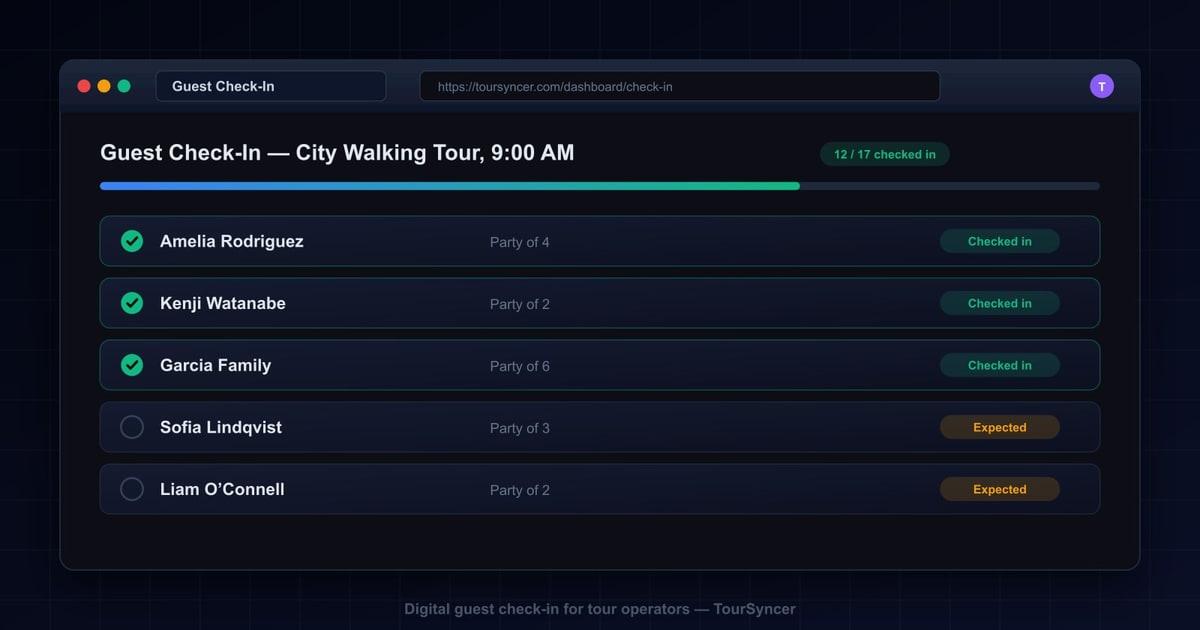
After: in TourSyncer, each departure has its own live manifest. A new booking appears on the 9:00 list the moment it lands -- no reprint, no photo, no phone call. The guide opens the manifest for their departure and sees one row per guest, each with a check-in action and a clear status: checked in or still expected. The 12:00 guide sees the 12:00 list and nothing else.

The manifest stops being a snapshot and becomes the single current version of the truth for that departure. The printer can go back to printing waivers.

How Do Boat Tour Operators Keep an Accurate Passenger List?

For a boat operator, the manifest is not just about service quality. Knowing exactly who is on the vessel is a safety and compliance requirement. If something goes wrong on the water, "roughly thirty people" is not an acceptable answer.

Before: a clipboard on the dock. The deckhand counts heads up the gangway while the office holds the booking list, and the two drift apart within minutes. A family swaps to the later sailing. A guest from the 2:00 turns up at 12:00 and gets waved aboard because there is space. The skipper logs "31 aboard" -- but 31 of whom? If the harbourmaster or your insurer ever asks who was on that sailing, you have a number, not a list.

After: per-guest check-in against the booking manifest for that specific sailing. Every guest who boards is checked in individually, and the status indicators show exactly who is aboard and who has not appeared. When the gangway closes, you do not just have a headcount -- you have a named passenger list tied to actual bookings, and it says the same thing the booking system says.

A count tells you how many. A per-guest check-in status tells you who -- and on a boat, who is the answer that matters. It is also the answer you can stand behind afterwards, on the record.

How Do You Check In Large Groups Without One Long Queue?

Festival departures, corporate outings, school groups, event-style start times: 120 guests arriving inside the same twenty minutes, many of them in parties of six, ten, or fifteen.

Before: one queue, one printed list, one highlighter. Group bookings show up as a single row -- "Sharma x 12" -- so when nine of the twelve arrive, you highlight the row and try to remember that three are missing. Or a group leader checks in "for everyone," including two people who are still looking for parking. Twenty minutes later nobody can say whether the group is complete, and the whole departure waits on a guess.

After: with TourSyncer's group management, every guest in a party is individually visible on the manifest. Nine of the twelve Sharma guests arrive: nine get checked in, three stay visibly pending, and any staff member looking at the same live manifest can see exactly which three. Because the list is shared, there are no competing copies -- whoever opens the manifest sees the same live status.

A party of twelve is twelve rows, not one -- so partial arrivals stop being a memory exercise. If large parties are a big part of your volume, our guide to group booking management goes deeper on handling them from enquiry to departure.

What Happens When Agent Bookings Arrive With the Wrong Guest Names?

If you sell through agents, hotels, or resellers, you know this manifest. Under an agency booking it reads "Guest 1, Guest 2, Guest 3." Or "J. Smith x 4," where J. Smith booked for colleagues whose names the agent never collected.

Before: the guide asks for names at the meeting point and writes the real ones in pen on the printout. After the tour, the printout goes in the bin. Two weeks later the agent disputes the invoice -- their client says only three people travelled -- and your only record of who actually showed up left the building with the recycling. Meanwhile the welcome itself suffers: greeting someone with "are you... Guest 3?" is nobody's idea of hospitality.

After: at the moment of check-in, staff correct or complete the guest name directly on the manifest -- and the fix is saved back to the booking itself. It is not a note on a copy; it is written to the record. When the invoice goes out or a report gets pulled later, the corrected names are already there, because check-in and the booking are the same data.

No more guessing who Guest 3 was -- the name gets fixed once, at the door, and every document downstream agrees. That last part is the point: a correction that only exists at check-in is a correction you will make twice.

What Does Paper Check-In Actually Cost a Tour Operator?

None of the scenes above looks expensive on its own. Spread them across a season and they compound into four kinds of loss.

Hours. Printing and reprinting manifests, calling the office to confirm late bookings, retyping pen corrections into the booking system after the tour -- when anyone remembers to. As a purely illustrative example: if check-in confusion delays each departure by ten minutes and you run six departures a day, that is an hour of paid guide time lost daily to squinting at a printout. That is guiding time and admin time, burned at the meeting point.

Errors. Every handwritten correction is a transcription waiting to fail. A guest gets marked as a no-show who was actually aboard. A party of eight gets invoiced as six. The count in the logbook disagrees with the count in the booking system, and nobody notices until it matters.

Revenue leaks. No-show disputes and chargebacks are decided on records. When a guest claims they never travelled and your only attendance evidence was a highlighter mark on discarded paper, refunding is easier than arguing -- so you refund. Agent invoice disputes drag on for the same reason: the names on the invoice do not match anything you can produce.

Guest experience. The first ten minutes set the tone for the whole tour. Guests who watched the check-in scramble start the walk already doubting the operation, and a confused start has a way of finding its way into reviews.

Here is the same morning, side by side:

Check-in momentPaper manifestLive manifest in TourSyncer
Late online bookingMissing from the 7:15 printoutOn the departure list the moment it books
Guest says "we booked last night"Phone call to the office, pen at the bottomAlready on the manifest -- check them in
Party of 12, nine arriveOne highlighted row and a memory exerciseNine checked in, three visibly pending
Wrong or placeholder namePen correction, binned after the tourCorrected at check-in, saved back to the booking
Who actually attended?A headcount and a guessPer-guest check-in status on the record
Dispute two weeks laterNo evidence either wayThe booking shows who was checked in

Why One Platform Beats a Standalone Check-In App

You can buy a check-in app on its own. Plenty exist. Before you do, think about what happens to the data.

A standalone check-in tool needs your guest list pushed into it before every departure -- which is a new daily chore -- and everything it learns at the meeting point stays inside it. The name your staff fixed in the check-in app does not fix the invoice. The attendance they recorded never reaches your reports. You have upgraded the clipboard, but the clipboard still does not talk to the booking system. Your stack just grew from a booking tool, a spreadsheet, and an invoicing app to all of that plus one more subscription.

Check-in delivers its full value only when it is not a separate product at all. In TourSyncer, the check-in screen is the booking manifest -- it reads the live list and writes corrections straight back, because they are the same system. Booking management, guest check-in, invoicing and payments, staff scheduling, and reporting come in one platform at one price; see pricing for how the plans work. There is one guest record, and it is correct everywhere because it was corrected once.

The connections run in every direction. Check-in is one step in a booking's life -- our guide on how to manage tour bookings covers the steps around it. Parties and private groups flow through the same manifest, handled by the group booking features described above. And because check-in status and name corrections are saved back to the booking record, the records you review later describe what actually happened at the meeting point -- useful context when you sit down with our post on tour operator analytics.

Buy a point solution and you create the next silo. Buy the platform and check-in becomes one screen of a system that already knows your guests.

Frequently Asked Questions

What is digital check-in for tour operators?

Digital check-in replaces the printed tour manifest with a live guest list in software. Staff check each guest in against the booking manifest for a specific departure, with clear status indicators showing who has arrived and who has not. In an all-in-one platform such as TourSyncer, the check-in status lives on the booking record itself, so guest lists, invoices, and reports stay consistent after the tour.

How does digital check-in work for group bookings?

In TourSyncer, every guest in a group booking is individually visible on the departure manifest. A party of ten appears as ten separate guests, each with an individual check-in status. If seven arrive on time, staff check in those seven and can see exactly which three are still pending, instead of highlighting one row on a printout and relying on memory.

Can staff fix a wrong guest name during check-in?

Yes. When a guest arrives and the manifest shows a placeholder like Guest 3 or a misspelled name, staff can correct or complete the name at the moment of check-in. In TourSyncer the correction is saved back to the booking itself, not scribbled on a copy, so invoices and reports produced after the tour carry the corrected name.

Does digital check-in help with no-show disputes?

It helps because attendance stops being a guess. Each guest on the manifest carries an individual check-in status, recorded against the booking for that departure. When a guest later claims they never travelled, or an agent questions an invoice, the operator can point to the check-in record for that departure instead of a headcount remembered from a discarded paper list.

Do tour operators need a separate app for guest check-in?

No, and a standalone check-in app often creates a new data silo: guest lists have to be moved into it, and corrections made there never reach invoices or reports. In an all-in-one platform like TourSyncer, check-in is part of the same system that holds bookings, invoicing, scheduling, and reporting, so there is one guest record and one subscription rather than another disconnected tool.

Retire the Printout

Tomorrow morning, a printout of tonight's bookings will already be wrong by the time your guide reaches the meeting point. Put the manifest on a live screen instead -- check-in, bookings, invoicing, scheduling, and reporting in one platform at one price. Book a demo and run your next departure from a guest list that is actually current.

Tags:tour check-in appdigital guest check-intour manifest softwaredigital check-in for tour operatorshow to check in tour guestsdigital guest check-in for toursreplace paper tour manifestslive tour manifest softwarepassenger list for boat tourscheck in large groups on toursfix guest names at tour check-in