TourSyncer Guest Check-In for Operators
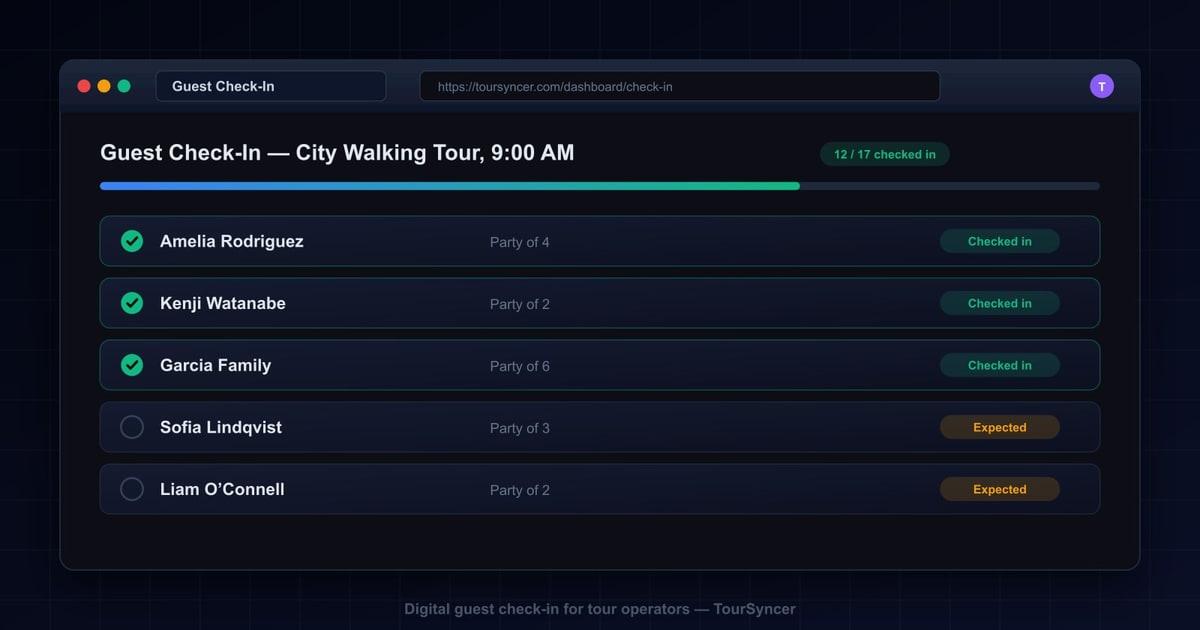
Use mobile manifests, individual guest names, check-in status, print, import, and export without claiming waivers, identity checks, or payment guarantees.
The short answer
TourSyncer guest check-in helps a team move from a static paper list to a mobile-friendly manifest connected to the booking workflow. Staff can work with individual guest names and check-in state, while operators retain print, import, and export options.
The verified feature is deliberately narrower than some legacy marketing claims: TourSyncer does not currently claim digital waiver signing, passport validation, medical-data verification, immutable timestamp evidence, offline check-in, or guaranteed chargeback protection.
Five useful workflows
1. Current departure manifest
Use the manifest linked to the selected departure instead of maintaining a separate spreadsheet. Review late manual bookings and reschedules before handoff.
2. Individual guest names
A multi-person booking can include the names needed to check in individuals rather than treating the party only as one booking contact.
3. Mobile-friendly status
Authorized staff can use the browser-based operator workspace on a phone or tablet to update check-in state. Test the exact device, browser, permissions, and connection used in the field.
4. Print fallback
Print a manifest when the meeting point has unreliable connectivity or operating policy requires paper. Offline app behavior is not claimed.
5. Import and export
Use supported manifest import and export to prepare or retain operational records. Verify column mapping and sample output before the departure date.
What should stay in a specialist system
- Digital waiver or e-signature records
- Passport scans or identity documents
- Medical histories or protected health information
- Equipment issue and return
- Vehicle, vessel, or room assignment
- Safety certification checks
- Access-control hardware
TourSyncer can retain relevant customer preferences or notes, but that does not make it the correct repository for sensitive documents.
Setup checklist
- Confirm the product, schedule, and departure capacity.
- Capture the booking contact and required individual guest names.
- Review manual bookings, cancellations, and reschedules.
- Configure roles so only authorized staff can see the manifest.
- Test check-in on the actual field device and connection.
- Print or export the fallback manifest.
- Define how post-departure corrections are approved.
- Retain only the attendance information the business legitimately needs.
Where the check-in feature fits
Guest check-in is useful as a focused first feature for guided visitor attractions, cooking classes, brewery and distillery tastings, food tours, boat tours, safaris, retreats, and other scheduled experiences. It becomes more valuable when connected to booking, customer, grouping, staff-assignment, and invoice records.
Frequently asked questions
What does TourSyncer guest check-in include?
TourSyncer includes mobile-friendly manifests, individual guest names, check-in state, printing, manifest import, and manifest export connected to booking operations.
Does TourSyncer collect digital waivers or passports at check-in?
Digital waiver signing, passport-file collection, and medical-data verification are not verified current TourSyncer capabilities. Use an appropriate specialist system when those records are required.
Does a TourSyncer check-in guarantee chargeback protection?
No check-in record guarantees that a payment processor will decide a dispute in the operator’s favor. Treat attendance status as one operational record and follow the processor’s current evidence requirements.