Dynamic Pricing for Tours (2026 Guide)
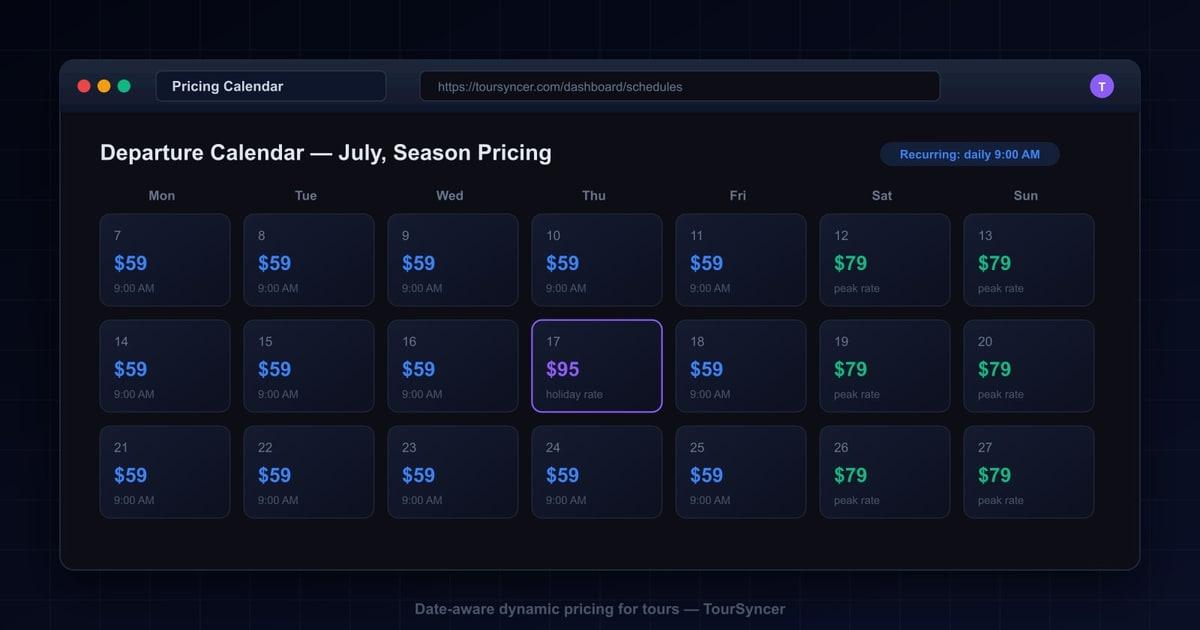
Configure tour prices by guest type, group, date, weekday, and season, then verify how supported booking and reschedule workflows apply the selected rate.
Seasonal Pricing Without Spreadsheets: Dynamic Pricing for Tour Operators, Done Right
It is the second Tuesday of July. You open your payouts with your coffee and something looks off. Saturday's 9am harbor cruise sold out - all 40 seats - but the deposit is smaller than the sold-out Saturday two weeks earlier.
You dig into the bookings. Every seat went out at $52. Your summer rate is $65. $52 is your April price.
So you open the pricing spreadsheet - the one named Summer Rates FINAL v3 - and there it is, highlighted in green: July Saturdays, $65. The grid was right. The booking page was never updated. Somewhere between season kickoff and the school-holiday rush, the one task that touches every single booking fell through the cracks. Forty seats, thirteen dollars a seat, every Saturday since mid-June.
Nobody stole anything. Nothing crashed. That is exactly what makes underpricing dangerous: it looks like a normal, healthy, sold-out tour. The boat still leaves full. The guests are still delighted. The money just quietly never arrives. And the fix - keeping a spreadsheet grid in sync with what your booking page actually charges, by hand, all season - is the kind of chore that will slip again next year.
The short answer: dynamic pricing for tours means configuring different prices for who is traveling and when they travel, then testing how those rules apply in each supported booking and reschedule workflow. In TourSyncer, the operator controls the rules; no AI demand algorithm changes prices on its own.
What Is Dynamic Pricing for Tours - and What Is It Not?
For a tour business, dynamic pricing rarely means what it means for airlines. You do not need machine learning. You need three things: higher prices on the dates guests most want, lower prices on the dates you struggle to fill, and confidence that the price you decided is the price actually charged.
To be explicit: this is not surge pricing. No algorithm watches demand and quietly moves your rates while you sleep. Calendar-based, date-aware pricing is a set of prices you choose, attached to dates you choose. Guests see a consistent, explainable price for their date. You see margins you actually planned.
That transparency matters in both directions. Guests distrust prices that jump between two page loads, and operators distrust systems they cannot predict. Date-aware pricing in TourSyncer works like a calendar, not a black box: you set the price for a date or a season, and that price is applied at booking and at checkout - and, critically, when a booking is moved to a differently priced date.
Dynamic pricing for a tour business really has two dimensions: who is traveling and when. The rest of this guide walks through both - starting with pricing by guest type, then the date-based jobs almost every operator faces - showing what each looks like today and what changes when prices live in the system instead of a grid a human has to keep in sync.
How Do You Price Adults, Children, and Infants Differently on the Same Tour?
Before: the child rate lives in someone's head. A family books a city tour - two adults, a nine-year-old, and a toddler. Whoever takes the booking has to remember the child rate, know the infant comes free, and do the arithmetic by hand, whether that is on the phone, at the desk, or in a reply to an email. Miss it and you either undercharge the family or send an awkward correction. When the rule lives in a spreadsheet, every staff member has to know it and apply it the same way, every time.
After: a rate per guest type, math done for you. In TourSyncer you set a price for each passenger type - for example an adult rate, a reduced child rate, and free infants - and the booking applies the right one to each guest automatically, at booking and at checkout. A party of two adults and a child is charged two adult rates and one child rate without anyone reaching for a calculator, and a free infant stays free without someone remembering to zero the line.
The two axes combine. A child booked on a peak-season Saturday is charged the child rate for that peak Saturday: your per-guest-type prices and your date-aware price calendar apply together, so a family booking the busiest date of the year is still priced correctly for every traveler on the booking.
How Do You Charge Summer High-Season Rates Without a Spreadsheet Price Grid?
Before: the grid. Every spring, someone builds the seasonal price grid in a spreadsheet. Shoulder season this, high season that, per tour, per departure time. It gets emailed around, argued over, and finalized. Then a human copies each number into the booking page, the walk-up price sheet, and the partner quotes - and repeats the exercise in reverse come September.
The failure mode is never the grid. It is the copying. One listing missed, one tour left at last year's rate, one late-night edit that changed the Saturday price but not the Sunday one. The grid says one thing; guests are charged another. You usually find out weeks later, in the payouts.
After: the calendar. In TourSyncer you set season prices once, on the schedule itself: June 15 through September 15 costs this, everything else costs that. Every departure inside that window carries the season price automatically. There is no second place to update, so there is no drift. The number you decided in spring is the number charged in July.
A simple hypothetical shows the stakes. Take a walking tour at $45 shoulder and $60 peak, with 25 guests a day across a 10-week summer. If the peak rate never reaches the booking page, that is $15 x 25 x 70 days - over $26,000 - gone without a single error message.
How Do You Set Premium Prices for Holiday Dates Like Christmas Markets and New Year Cruises?
Before: the December edit. Christmas market tours, Christmas Eve slots, New Year cruises - the highest-demand dates of the year get priced by manually editing listings in late November. Then someone has to remember to put everything back in January. Miss the first edit and your best dates sell at ordinary prices. Miss the second and January guests see December rates and bounce.
Operators know this dance so well it has a season of its own. It also collides with the busiest operating weeks of the year - which is exactly when nobody has a free evening to re-edit listings.
After: date-specific prices. With date-aware pricing you attach a premium price to the exact dates: December 20 through 24, December 31. Those prices apply on those dates and only those dates, and stop applying on their own. No November editing marathon, no January cleanup, no discovering in the New Year that Christmas Eve sold at the Tuesday-in-March rate.
Can Weekday Discounts Fill Slow Tuesday Departures?
Before: coupon roulette. The Tuesday 2pm departure runs at four seats out of twenty, so you spin up a discount code: TUESDAY15. You post it, email it, and hope the right people use it. Some codes leak to coupon aggregator sites and get applied to Saturday bookings that would have paid full price. Margin becomes guesswork - you no longer know what an average seat actually earns.
After: the price lives on the schedule. Instead of discounting around the price, you change the price where it lives. Monday through Thursday departures get a lower rate, set directly on the schedule. Every guest browsing a Tuesday sees the lower price with zero friction - no code to find, type, or fail. Weekend prices stay whole.
A cheaper Tuesday is not a discount; it is a price. Guests comparing dates see an honest tradeoff - pay less midweek, more on Saturday - which reads as fair rather than gimmicky. And when you review the month, each departure earned exactly what you set it to earn.
How Do You Run a Daily Departure All Season Without Creating 90 Departures by Hand?
Before: 90 rows of data entry. The 9am coastal walk runs every day from June through August. In a manual setup that means creating roughly 90 departures one at a time, each with the right time, capacity, and price. Every click is a chance to typo a date or paste last season's rate. When the fall schedule shifts to weekends only, you do it all again.
After: one series, one calendar. In TourSyncer you build the tour, its departure schedule, and its prices in one place. Create one repeating series - daily at 9am, or weekends only - and the whole season exists from a single setup. Season and holiday prices from your calendar apply across every departure in the series automatically.
Series-level management matters just as much when plans change. If the boat goes in for repair or the route closes, you can cancel or remove the whole series at once, and guests are notified with a reason instead of discovering a dead booking. Refunds stay a deliberate decision you make case by case - never something fired off automatically before you have decided how to handle it.
What Happens When a Guest Reschedules Across a Price Boundary?
Here is the leak almost nobody prices in. A guest books a $45 shoulder-season Tuesday, then emails to move to a peak-season Saturday - the $60 date. In a manual setup, whoever handles the email drags the booking to the new date and moves on. The original $45 follows the booking. Nobody decides to give away $15; the system simply has no idea the two dates are priced differently.
Multiply that by every reschedule in a season and you get a leak with no line item. It never surfaces as an error because nothing failed: the booking is valid, the guest is happy, the tour runs.
Date-aware pricing closes this by treating the date, not the booking, as the source of truth. When a booking is rescheduled in TourSyncer, the price attached to the new date applies. Move from a cheap Tuesday to a premium Saturday and the premium Saturday rate is charged - the pricing calendar is enforced on reschedules the same way it is at booking and checkout.
This is the case where manual systems silently lose money, and it is the clearest single argument for putting prices on the calendar instead of in a grid a human has to remember.
What Does Manual Seasonal Pricing Actually Cost You?
Put the four use cases together and the spreadsheet approach carries four distinct costs - none of which appear on any report.
Hours. Building the grid, copying it into listings, reverting holiday edits, creating departures row by row, and spot-checking that the website still matches the sheet. It is unglamorous admin work that lands in spring and December, precisely when your calendar is fullest.
Errors. Every manual copy is a chance for drift between the price you decided and the price guests pay. Drift stays invisible until someone reconciles payouts against the grid - and most operators only do that once something already feels wrong.
Revenue leaks. Underpriced peak Saturdays, holiday dates sold at ordinary rates, reschedules that carry cheap prices onto expensive dates, and discount codes applied where they were never meant to go. Each one is small. Together they are a season-long drip.
Guest trust. When two guests on the same departure compare receipts and find different prices for no reason they can see, your pricing reads as arbitrary. Consistent, date-based prices are easier to defend: the Saturday price is the Saturday price.
Side by side, the difference is not subtle:
| Pricing job | Spreadsheet status quo | Price calendar in TourSyncer |
|---|---|---|
| Adult, child, and infant rates | Child rate memorized, math done by hand each booking | A rate per guest type, applied automatically at checkout |
| Summer high-season rates | Grid updated in the sheet, forgotten on the booking page | Season price set once, charged at booking and checkout |
| Holiday premiums | Listings hand-edited every December, reverted in January | Date-specific prices apply and expire on their own dates |
| Weekday discounts | Ad-hoc codes, leaked coupons, margin guesswork | Lower Tuesday price set on the schedule itself |
| A full season of departures | 90 departures created by hand | One repeating series with one price calendar |
| Reschedules across seasons | Old price silently carried to the new date | Price of the new date applied automatically |
For the broader question of what your dates should cost - not just how to enforce them - see our guide to revenue optimization and pricing strategy for tour operators.
Why Not Just Buy a Pricing Tool? One Platform, One Price
At this point the obvious move looks like buying a pricing tool and bolting it onto the stack. Resist it. A point solution fixes one silo by creating the next one. A standalone pricing engine does not know who is on tomorrow's manifest, cannot put the right amount on an invoice, and has no idea your Tuesday roster just changed. You end up syncing the pricing tool with the booking tool with the spreadsheet - the exact chore you were trying to escape.
The reason a price calendar works in TourSyncer is that everything that consumes the price lives in the same system. Booking management reads it when the guest picks a date. Checkout charges it. Check-in lists the guests who paid it. Invoicing and payments work from the same booking records. Scheduling knows which departures carry it. Reporting rolls it all up without an export in sight.
That is the one-platform, one-price argument: booking management, check-in, invoicing and payments, scheduling, and reporting in a single subscription instead of five tools with five bills and four integration gaps. One pricing plan covers all of it, so a strong season does not turn into a bigger software bill.
Consolidation compounds, too. Once every booking is charged the price you actually set, your numbers finally mean something - revenue per departure, per season, per tour. That is when reporting starts earning its keep; see the metrics worth tracking once your pricing data is trustworthy. And if you run private groups or charters alongside scheduled departures, the same logic extends to group bookings: one system, one record of what was quoted and what was charged.
Frequently Asked Questions
What is dynamic pricing for tours?
Dynamic pricing for tours means using different operator-configured prices for traveler types, groups, dates, weekdays, or seasons. In TourSyncer, verify the applicable rule in the booking and reschedule workflow before publishing it.
Does dynamic pricing mean an algorithm controls my tour prices?
No. The calendar-based approach described here is fully operator controlled. You decide the summer rate, the holiday premium, and the weekday discount, and you set each one on specific dates. The software only enforces what you configured. Nothing changes a price unless you change it, which keeps quotes predictable for guests and margins predictable for you.
What happens to the price when a guest reschedules a booking?
In a manual setup, a reschedule usually keeps the original price even when the new date should cost more, and the difference is silently lost. With date-aware pricing in TourSyncer, the price attached to the new date applies when a booking is moved, so a guest who shifts from a shoulder-season Tuesday to a peak-season Saturday is charged the peak-season Saturday rate.
Can I set a lower price for weekday departures?
Yes. Weekday discounts are one of the most common uses of a price calendar. Instead of publishing discount codes and hoping the right guests find them, you set a lower price directly on Monday through Thursday departures. Every guest who books those dates sees the lower price automatically, and your weekend rate stays untouched.
How do recurring departures work with seasonal pricing?
You create one repeating schedule series, such as daily at 9am or weekends only, instead of adding each departure by hand. Season and holiday prices from the calendar apply across the whole series. If plans change, you manage the series as one unit: you can cancel or remove it and guests are notified with a reason. Refunds remain a deliberate decision you make, never an automatic one.
Can I charge different prices for adults, children, and infants?
Yes. You set a rate for each passenger type - for example an adult price, a reduced child price, and free infants - and the booking applies the right rate to each guest automatically at booking and checkout. Per-guest-type pricing works alongside date pricing, so a child booked on a peak-season date is charged the child rate for that date.
Set the Calendar Once. Charge Right Everywhere.
Configure your season, holiday, weekday, traveler, and group rules, then test representative direct, manual, and rescheduled bookings before launch. Review current plans, or book a demo and bring a real season schedule.