Back to Blogs

Group Booking Management for Tour Operators

TourSyncer Team
July 9, 2026
12 min read
Group Booking Management for Tour Operators

End the 7am WhatsApp scramble. TourSyncer groups bookings automatically as they arrive and schedules guides per departure, so group days run on one live list.

Group Bookings Without the Morning WhatsApp Scramble

It is 6:52 on a Tuesday morning and you are on your second coffee and your third WhatsApp thread. The 10am walking tour has 45 people on it -- the booking sheet says so, anyway. Three guides are working today, and nobody has written down who takes which party. Maria wants to know if the Garcia group of 11 is hers. Tom is asking whether the school party confirmed for 9:30 or 10.

The manifest you exported last night is already missing the two bookings that came in after dinner. So you do what you do every operating morning. Booking tool in one tab. Staffing spreadsheet in another. Printout on the counter. You reconcile all three by hand, type guide assignments into the group chat, and forward a screenshot of the name list.

Then you answer "which bus is the Garcia party on" twice, because the answer changed after the screenshot went out. Here is the thing: your tours are fine. Your guides are good. Group chaos is a coordination problem, not an effort problem. The scramble happens because bookings live in one place, staffing in a second, and groups in a third -- and every morning you are the human bridge between them.

The short answer: group booking management stops being chaotic when bookings, guide scheduling, and grouping live in one system. TourSyncer, an all-in-one tour operator software platform, organizes bookings into groups automatically as they arrive and lets you schedule guides against each departure. On the day, every guide sees their departure and its organized groups on a live manifest -- not a screenshot in a group chat.

Why Do Group Bookings Turn Into Morning Chaos?

Every group-day question you answer at 7am is really a lookup across three disconnected sources. The booking tool knows who paid. The spreadsheet knows who is working. The printout -- or the whiteboard, or your memory -- knows how the parties split. None of them update each other, so you do.

The 7am questionWhere the answer lives todayWhere it lives in TourSyncer
Who is guiding the 10am?A rota spreadsheet plus a phone callThe staff schedule attached to the departure
Which party is in which group?A highlighted printout from last nightGroups created automatically from the bookings
Did the 9pm booking make the list?Only if someone re-exported the manifestYes -- bookings flow into groups as they arrive
What am I running today?A WhatsApp message from the ownerThe live manifest for each scheduled departure

The rest of this post walks through four group-booking situations most operators will recognize, with an explicit before and after for each.

How Do You Split a 45-Person Booking Day Across Three Guides?

Before: a whiteboard and three phone calls. The 45 people did not book as 45 people. They booked as 14 separate parties over three weeks -- a family of six, a hen party of 11, couples, a few solo travelers. The night before, someone copies names from the booking tool into three whiteboard columns, one per guide.

Then come three phone calls to tell each guide what they have. If a party of four books at 9pm, the whiteboard is already wrong, and either someone redoes it or the first guide to arrive discovers four extra guests at the meeting point.

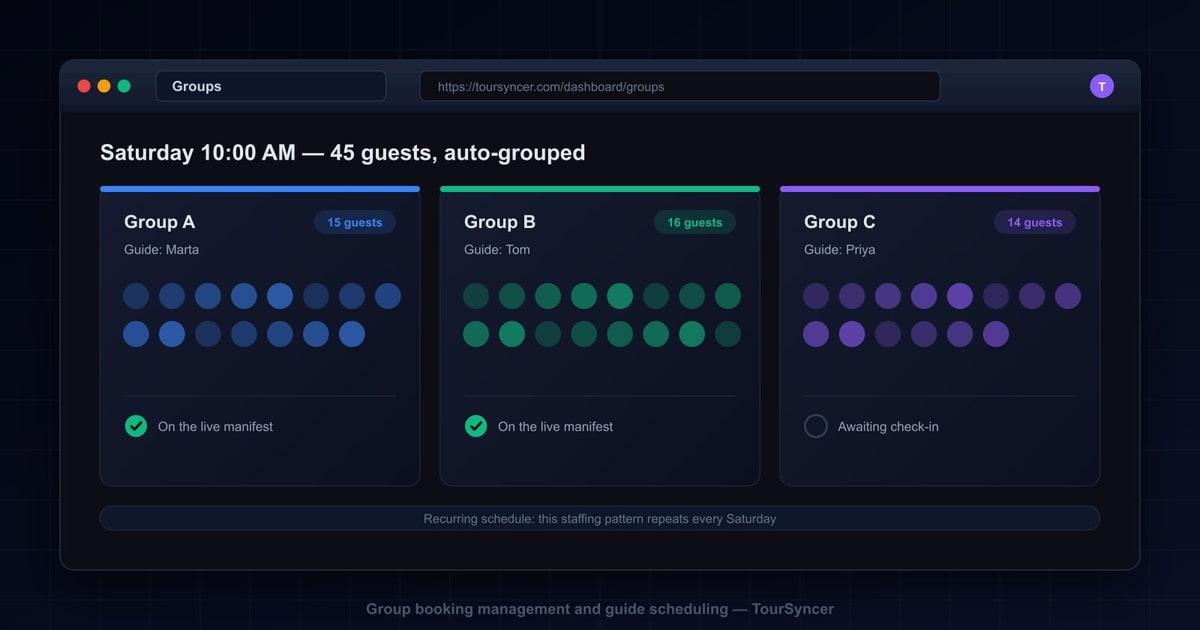
After: the bookings arrive already organized into groups. As each booking comes in, TourSyncer automatically organizes it into a group for that departure. The 45-person day never exists as one undifferentiated blob of names -- it is a set of distinct parties from the moment the second booking lands.

You schedule your three guides against the departure, so everyone knows what they are running, and everyone works from the same organized list. Deciding who takes which parties becomes a two-minute read of a structured list, not an evening of transcription and a morning of corrections.

How Do You Run a School or Corporate Group Day With Mixed Parties?

Before: one giant name list and a highlighter. A school books 52 students and staff. Two families and a walk-in couple book the same slot. The organizer emails a name list, someone merges it with the booking export, and the result is one long alphabetical list where a chaperone who booked separately sits nowhere near her class.

You print it and attack it with three colors of highlighter. The highlighter version -- the only version that actually reflects how the day will run -- exists on one piece of paper, in one person's hand, and stops being true the moment anything changes.

After: parties stay distinct groups from booking to manifest. In TourSyncer, each booking is its own party inside the departure. The school block, the two families, the couple -- separate groups on the same departure, from the moment they book. On the day, staff see those organized groups on the live manifest.

Nobody rebuilds the structure with a highlighter, because the structure was never lost. The party boundaries that existed at booking time are the same ones your team sees at the meeting point.

How Do You Schedule Guides for a Whole Season of Departures in One Pass?

Before: a monthly rota spreadsheet nobody updates. Someone builds the rota in a spreadsheet and emails it around. It is out of date within a week. A guide swaps a Saturday verbally. Another books a holiday that lives on a sticky note. By week three, the only accurate rota is the one in your head -- which is why every staffing question still comes to you.

After: set the recurring pattern once, and staffing repeats with it. TourSyncer lets you schedule staff and guides directly against departures, so every departure has a named guide and every guide knows what they are running. Recurring schedules carry their staffing with them: a season of Tuesday-and-Thursday-morning departures is one pattern set once, not thirty spreadsheet rows re-typed every month.

A whole season stops being a monthly document-production exercise and becomes a one-time setup you adjust by exception. The knock-on effect is subtle but real: when the schedule lives with the departure, a season change is an edit, not a re-broadcast. Guides check the schedule instead of asking you, and the sticky notes retire. We cover the wider staffing picture in our guide to staff scheduling and resource allocation.

What Does Day-Of Clarity Look Like Without the 7am Scramble?

Before: the WhatsApp scramble from the top of this post. Assignments announced in a chat thread. Name lists forwarded as screenshots. Questions answered twice because the answer changed in between. The guides who ask get answers; the guide who was driving does not, and finds out at the meeting point in front of the guests.

After: each guide sees exactly their departure and its organized groups on the live manifest. Because groups are created from the bookings themselves, the group list is never a separate artifact that can go stale -- it flows straight into check-in and the manifest. The booking that arrived at 9pm is on the list at 7am, in its own party, with no export step in between.

Check-in works off the same groups, so ticking guests off on the day happens party by party instead of hunting through one long list. We walk through that half of the morning in our post on digital check-in for tour operators.

This is the point worth pausing on. Most tools treat the group list as a document somebody produces, and any produced document starts aging the moment it is made. In TourSyncer, group management is not a document. It is the live state of the bookings, organized into parties, visible to the people running the departure.

What Is the Real Cost of Running Group Days by Hand?

None of this feels expensive in the moment. It is 45 minutes here, a phone call there. Add it up across a season and it looks different.

Hours. Say the morning reconciliation takes 45 minutes on each operating day -- a hypothetical, but a familiar one. Six mornings a week over a 30-week season is roughly 135 hours a year spent rebuilding a list that software should simply keep current. That is more than three full working weeks of admin hours, spent before the first guest arrives.

Errors. Every manual hop between tools is a chance to drop something. The late booking that missed the printout. The party of 11 counted as ten. The guide who was told 9:30 after the departure moved to 10. Each error is small on its own; each one plays out in front of paying guests.

Revenue leaks. Mistakes on group days get expensive fast. A family standing at the meeting point with no guide expecting them tends to end in a goodwill discount, a comped rebooking, or a refund you choose to issue to protect the review. None of that shows up on any report as "cost of the spreadsheet" -- but that is exactly what it is.

Guest experience. A group day that starts with guides huddled over a printout, calling out surnames in a car park, feels disorganized, because it is. Your guests booked a tour, and the first ten minutes told them the operation runs on paper. That impression sticks to the review even when the tour itself is excellent.

Owner attention. The scramble has one more cost that never shows up as hours: it puts you at the center of every single morning. If the group days fall apart the week you take a holiday, the business has a single point of failure, and it is you. Coordination that lives in a system instead of in your head is what makes the operation leaveable.

Why Buying a Scheduling Tool Alone Just Creates the Next Silo

There is a tempting quick fix here: buy a staff scheduling app. Or a check-in app. Or a group add-on bolted to the booking tool. Each one solves the piece it touches -- and opens a new gap on either side of it, because it still has to be reconciled with everything it does not touch.

That is how operators end up with the duct-taped stack: a booking tool, a spreadsheet for manifests, a scheduling calendar, an invoicing app, and a reporting add-on. Each has its own login, its own export button, and its own version of the truth. The morning scramble does not disappear; it just moves between different pairs of tools. A point solution asks you to be the integration.

The alternative is consolidation. TourSyncer puts booking management, check-in, invoicing and payments, staff scheduling, and reporting in one platform, on one subscription at one price. The group that forms when a booking arrives is the same group the guide checks in against and the same line in your end-of-month numbers.

When the school organizer asks about billing for all 52 people, that side of the day is its own topic -- see invoicing for tour operators for how the billing half of a group day fits together. And because every group day flows through one system, your reporting reflects what actually ran, without a Monday-morning assembly job across exports.

One platform does not just replace four subscriptions. It removes the export-import-reconcile work between them, which is where the morning scramble actually lives.

Frequently Asked Questions

What is group booking management software?

Group booking management software organizes large or mixed bookings into distinct parties, connects each party to a departure, and keeps guide schedules and manifests in sync with the bookings. Instead of one long name list, operators work with organized groups that flow from booking to check-in. TourSyncer builds this into its tour operator platform alongside scheduling, invoicing, and reporting.

How does TourSyncer organize bookings into groups?

Grouping happens automatically as bookings arrive. When a new booking comes in for a departure, TourSyncer organizes it into a group for that departure, so a 30-person day reads as a set of distinct parties rather than one undifferentiated list. Because groups are generated from live bookings, the group list is never a separate document that goes stale.

Can I schedule guides for recurring tour departures in one pass?

Yes. TourSyncer lets you schedule staff and guides against departures, and recurring schedules carry their staffing with them. Set the pattern once -- for example, one guide runs the Tuesday and Thursday morning departures -- and the staffing repeats with the schedule. That replaces the monthly rota spreadsheet that someone has to rebuild and re-send every time the season changes.

How do guides know which groups they have on the day?

Each departure has a live manifest that shows its organized groups. Staff scheduled against a departure see exactly what they are running and which parties are on it, including bookings that arrived after any printout would have been made. That removes the morning message thread where assignments and name lists get forwarded, re-forwarded, and corrected.

Do group lists stay accurate when bookings change?

Yes, because the group list is not a separate artifact. Groups are created from the bookings themselves as they arrive, and those same groups flow into check-in and the live manifest. There is no export step, so there is no version of the list that can go stale between the booking system and the person standing at the meeting point.

Ready to Retire the 7am Scramble?

Your group days do not need more effort -- they need one system where bookings, groups, and guide schedules live together. See what one platform at one price looks like on our pricing page, or book a demo and walk through a real group day with us.

Tags:group booking management softwaretour guide schedulingstaff scheduling for tour operatorsmanage group bookingsautomatic group creation for tour bookingshow to split a large tour group across guidesschedule guides for recurring departuresschool group tour booking managementtour departure manifest by groupgroup bookings for walking toursguide rota software for tour operators