Invoicing Software for Tour Operators

Send invoices from the booking, attach payment links, and track status in one place. How TourSyncer ends the Word-doc invoice chase for tour operators.
It is 4:40 on a Tuesday afternoon and you owe three people an invoice. The corporate walking tour from last Thursday went perfectly -- 22 guests, good weather, a handshake and a "send us the invoice" at the end. So you open the Word document you used for the last corporate group, change the company name, retype the date, and recalculate the total on your phone. Somewhere between the booking spreadsheet and the Word file, the group grew from 20 to 22 guests, and you are not completely sure the number you just typed reflects that.
You paste your bank details into the email, attach the file, write "please find attached", and hit send. Then you set a calendar reminder: chase this in two weeks.
Behind it in the queue: a private family tour you quoted by email in May, and a travel agent who books with you all season and settles after delivery. Each one means the same ritual. Word document. PDF printer. Bank details. Follow-up email. Wait.
The tours are delivered. The money is not in the bank. That gap -- between running the tour and getting paid for it -- is one of the quietest leaks in a tour business, and the Word-plus-bank-transfer routine is what keeps it open.
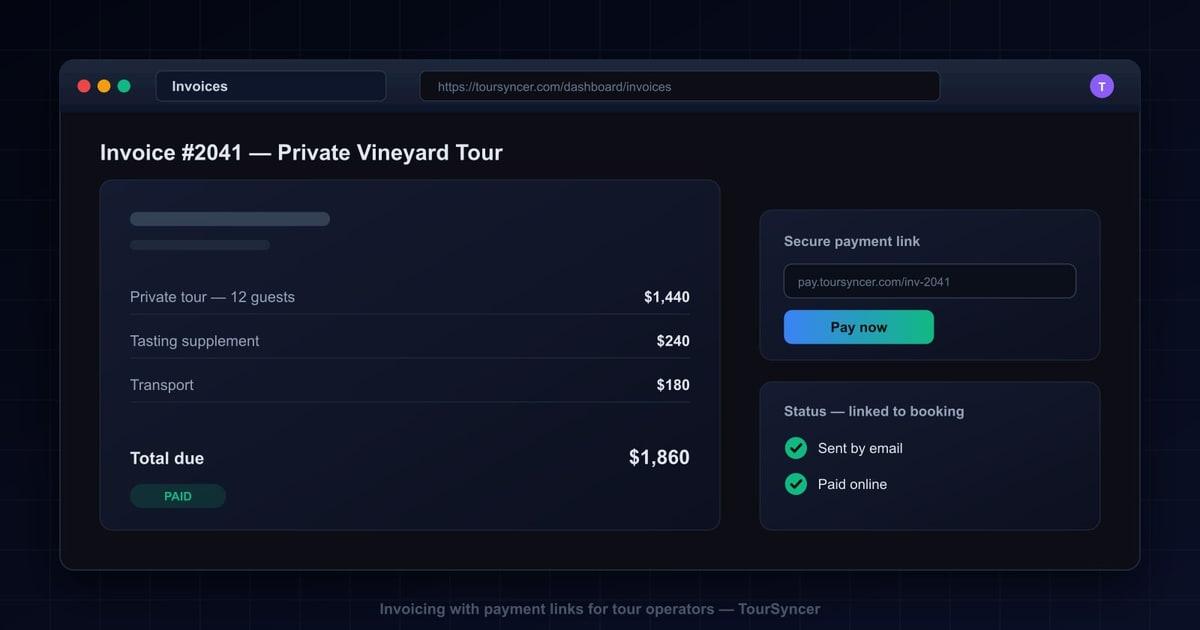
The short answer: invoicing software for tour operators works when the invoice is born from the booking. TourSyncer creates professional invoices directly from the booking record, so names, dates, and amounts are already right. You send the invoice by email from inside the platform, attach a secure online payment link so the customer can pay immediately, and the payment status is tracked with the booking -- no separate tool to reconcile.
Stop Chasing Payments: Invoicing That Fits How Tour Operators Actually Sell
Most booking tools assume one payment story: a guest finds your tour online, pays at checkout, done. Plenty of tour revenue really does work that way. But the biggest bookings usually do not.
Private groups get quoted by email. Corporate outings need a document that an accounts team will accept. Travel agents settle after delivery. School groups pay a deposit in spring and the balance the week before the trip. Every one of those sales ends with the same sentence: "can you send us an invoice?"
And in most tour businesses, that sentence triggers a side quest that happens entirely outside the booking system: a Word template, a PDF, an email with bank details pasted in, and a spreadsheet -- or a memory -- to track who has paid. The invoice knows nothing about the booking. The booking knows nothing about the payment. You are the integration layer between the two.
Smart invoicing closes that loop by starting from the booking instead of a blank document. Here is the whole difference in one table:
| Step | The duct-taped way | With TourSyncer |
|---|---|---|
| Create the invoice | Copy an old Word doc, retype names, dates, and amounts | Invoice created from the booking, details already right |
| Send it | Export the file, attach it, write a cover email | Emailed directly from TourSyncer |
| Get paid | Bank details pasted in the email, wait for a transfer | Secure payment link on the invoice, pay immediately |
| Know it is paid | Check the bank statement, update the spreadsheet | Payment status tracked with the booking |
The rest of this guide walks through the four situations where tour operators actually need invoices -- and what each one looks like before and after invoicing moves into the booking platform.
How Do You Invoice a Private or Custom Tour Quoted by Email?
Before: the Word ritual. The inquiry lands in your inbox. You go back and forth on dates and group size, quote a price, and the customer says yes. Now the paperwork starts. You copy the Word invoice from the last private tour, swap the names, retype the date, adjust the total, and run it through the PDF printer. You paste your bank details into the email body -- again -- and send it off.
Every field you retyped is a chance to get something wrong. Was the final head count six or eight? Did the price include the tasting stop you added in the third email? The invoice is a fresh copy of data that already exists somewhere else, typed out by a tired human at the end of the day.
After: the invoice comes from the booking. In TourSyncer, that quoted tour lives as a booking, and the invoice is created directly from it. The guest name, the tour date, and the amount come from what is actually confirmed. If the quote included extras, you edit the line items instead of rebuilding the whole document. Then you send it by email straight from TourSyncer, with a secure online payment link attached.
The customer clicks the link and pays on the spot instead of copying bank details into their banking app. When the money lands, the status changes on the booking itself. What used to be a 25-minute Word session becomes a couple of clicks -- and nothing gets retyped.
How Do You Handle a Corporate Group That Pays a Deposit Now and the Balance Later?
Before: two Word invoices and a calendar reminder. Corporate outings and school groups rarely pay everything up front. So you build one Word invoice for the deposit, send it, and set a reminder to build the second one "closer to the date." That reminder fires in the middle of your busiest week. You push it a day, then three. The balance invoice goes out late, which means it gets paid late, which means you are covering guides and venue costs for a tour whose revenue is still sitting in someone else's account.
And the tracking lives nowhere. Deposit paid? Check the bank statement. Balance invoiced? Check your sent folder. Two documents, one spreadsheet, three places to look.
After: two invoices, one booking. In TourSyncer you send an invoice for the deposit when the group confirms, and a second invoice for the balance when you are ready. Both are created from the same booking. Both carry their own payment link. Both statuses sit with the booking, so one glance tells you: deposit paid in March, balance still outstanding. No reminder archaeology, no cross-referencing three tools at month end.
Group business has plenty of other moving parts -- head counts that change, organizers who rewrite the plan twice, dietary lists. Our guide to group booking management covers that side of it; invoicing is the piece that makes sure the group actually pays for all of it.
How Do You Bill Travel-Agent Bookings After the Tour Runs?
Before: the who-owes-what spreadsheet. Agents are great for filling departures and brutal for bookkeeping. They send guests through the whole season and settle after delivery, so somewhere on your laptop lives a spreadsheet: agent name, tour date, amount, a "sent?" column, a "paid?" column. It gets updated from memory and inbox searches, usually at month end. Rows get missed. And a missed row is a tour you paid guides and fuel for, delivered well, and never collected on.
After: every agent booking carries its own invoice. In TourSyncer, an agent booking is a booking like any other. After the tour runs, you create the invoice from it -- tour name, date, and amount already correct -- and email it to the agent with a payment link attached. The payment status is visible on the booking, so whether an agent has paid for a given tour is a glance at that booking, not a reconstruction project.
If you want the wider picture of how bookings and the money attached to them should move through a tour business, see our playbook on how to manage tour bookings.
How Do You Collect an Outstanding Balance Without an Awkward Phone Call?
Before: the "just following up" thread. You drafted the email three times to make it sound friendly. "Just checking whether the invoice from the 12th made it through!" It reads apologetic no matter how you phrase it. The client replies "we will look into it," and the thread goes quiet for another week. Worst case, you finally call, they insist they paid last Tuesday, and now you are scrolling a bank statement mid-conversation, trying to prove a negative to a customer you want to keep.
After: resend the invoice and let the link do the asking. Because payment status is tracked with the booking, you know before you send anything whether the money actually arrived -- so you never accidentally chase a client who already paid. If the invoice really is outstanding, you resend it from TourSyncer with its payment link. A live link the client can click and pay in a minute converts far more gracefully than bank details buried in a two-week-old email. Then you watch the status flip on the booking.
The invoicing tools built into TourSyncer turn the most awkward conversation in your business into a click. The email does the asking. The link removes the friction. The status tells you when to stop worrying.
What Does Manual Invoicing Actually Cost a Tour Operator?
None of this feels expensive in the moment. One Word invoice is 20 minutes. One follow-up email is two. The cost only shows up when you add it up.
Hours. Each manual invoice means finding the last one, retyping the details, double-checking the math, printing to PDF, writing the email, and logging it somewhere. As a purely illustrative example: if you send 15 invoices a month and each one eats 20 to 25 minutes across creation and follow-up, that is five to six hours of admin work every month -- most of a working day spent retyping information your booking records already hold.
Errors. Every retyped field is an opportunity for a mistake: the old group size, last season's price, the right invoice attached to the wrong email. Each error costs you twice -- once in the time it takes to correct, and once in credibility with exactly the clients who book the biggest tours. Corporate bookers and agents remember whose paperwork they had to fix.
Revenue leaks. The balance invoice that never got sent. The agent row that fell off the spreadsheet. The invoice that went out but was never chased. These losses never show up as a line item, because the tour ran and the costs were paid -- the revenue simply never landed. As a hypothetical: if your average private group invoice is worth $1,200, one forgotten balance per season is $1,200 of delivered work you gave away.
Blindness. When invoices live in a folder and payments live in a bank statement, the question "how much money is owed to us right now" has no quick answer. It should not take an afternoon of cross-referencing to find out -- what that kind of financial visibility looks like is something we cover in tour operator analytics and metrics.
Why One Platform at One Price Beats Another Invoicing App
The tempting fix is a standalone invoicing app. It will certainly make prettier invoices than Word. But it has the same fatal flaw: it does not know your bookings. You still retype the guest names, the dates, and the amounts -- you have just moved the retyping into a nicer interface. And now the money story of a single tour lives in three places: the booking tool, the invoicing app, and the bank.
That is how the duct-taped stack gets built, one reasonable-sounding subscription at a time. A booking tool here, a spreadsheet manifest there, an invoicing app, a scheduling calendar, a reporting add-on. Each new point solution fixes one problem and quietly creates the next silo -- plus the next monthly bill.
TourSyncer takes the opposite approach: one platform that covers booking management, invoicing and payments, and staff scheduling, in one subscription at one price. The invoice works precisely because it is not a separate product -- it is invoicing that lives with your bookings. The booking supplies the correct details, the payment link closes the loop, and the paid status flows straight back into the same records your daily operations run on.
That also changes the buying math. The question is not "what does an invoicing app cost" -- it is what replacing the whole pile of tools costs, and whether one predictable price beats four unpredictable ones. You can see exactly what that one price covers on our pricing page.
Frequently Asked Questions
What is the best way to create invoices as a tour operator?
Create the invoice from the booking itself rather than in a separate document. When invoicing software is tied to booking records, the guest names, tour dates, and amounts are already correct, which removes the retyping errors that come with Word templates. TourSyncer builds each invoice from the booking, sends it by email, and tracks its payment status in the same place.
Can customers pay a tour invoice online?
Yes. In TourSyncer, each invoice can carry a secure online payment link. The customer opens the invoice email, clicks the link, and pays immediately -- no bank details to copy, no transfer reference to guess. Once payment comes through, the status updates with the booking, so the operator does not need to check a bank statement to confirm.
How do I invoice a deposit now and the balance later?
Send two invoices from the same booking: one for the deposit when the group confirms, and a second for the balance closer to the tour date. Each invoice carries its own payment link and its own status, and both stay attached to the booking, so you always know exactly what has been paid and what is still outstanding.
How do I know which tour invoices have been paid?
Payment status is tracked with the booking in TourSyncer, so there is no separate tool to reconcile. Open the booking and the invoice status is right there: sent, paid, or still outstanding. That replaces the usual routine of checking the bank statement, updating a spreadsheet, and hoping the two agree before you chase a customer who already paid.
How should tour operators invoice travel agents?
Invoice the agent from the booking after the tour is delivered, the same way you would invoice any customer. Because the invoice is tied to the booking, the tour name, date, and amount are already correct, and the payment status stays visible with that booking. That replaces the who-owes-what spreadsheet most operators keep for agent bookings.
Send Your Next Invoice From the Booking
If the gap between "tour delivered" and "money in the bank" is where your revenue leaks, fix it at the source: the booking. See what one platform at one price replaces on our pricing page, or book a demo and send your first invoice from a real booking.